Category: App Review

  • 💡 Digital Zen: 10 Online Habits That Will Instantly Boost Your Focus and Productivity

    💡 Digital Zen: 10 Online Habits That Will Instantly Boost Your Focus and Productivity

    In a world of endless notifications, open tabs, and algorithm-driven distractions, staying focused online can feel like a superpower. But achieving digital clarity doesn’t require drastic changes—it starts with small, intentional habits. Welcome to Digital Zen: a mindset and method for reclaiming your time, attention, and peace in the digital age.

    Here are 10 online habits that can help you boost productivity and stay mentally sharp:

    1. 🧘‍♂️ Start with a Digital Ritual

    Begin your day with a consistent online routine. Whether it’s checking your calendar, reviewing goals, or reading a short article, a ritual sets the tone and reduces decision fatigue.

    2. 📵 Silence the Noise

    Turn off non-essential notifications. Use “Do Not Disturb” modes during deep work sessions and schedule specific times to check messages.

    3. 🗂️ Organize Your Digital Space

    Declutter your desktop, browser bookmarks, and cloud folders. A clean digital workspace reduces stress and helps you find what you need faster.

    4. ⏳ Use the Pomodoro Technique

    Work in focused 25-minute intervals with 5-minute breaks. Apps like Focus Booster or TomatoTimer can help you stay on track without burning out.

    5. 🧠 One Tab at a Time

    Avoid tab overload. Use extensions like OneTab or Workona to consolidate open tabs and reduce cognitive clutter.

    6. 📋 Create a Digital To-Do List

    Use tools like Todoist, Notion, or Google Tasks to track your goals. Prioritize tasks with labels like “urgent,” “important,” or “later.”

    7. 🔍 Search Smarter

    Learn advanced search techniques (like using quotes or minus signs) to find information faster and avoid rabbit holes.

    8. 🧹 Unsubscribe Ruthlessly

    Clean your inbox by unsubscribing from newsletters you don’t read. Use tools like Unroll.Me to streamline the process.

    9. 🌙 Embrace Digital Minimalism

    Limit your app usage to essentials. Ask yourself: “Does this tool serve me, or distract me?” Delete what doesn’t align with your goals.

    10. 📈 Reflect Weekly

    Set aside time each week to review your digital habits. What worked? What didn’t? Adjust and evolve your system to stay aligned with your priorities.

    🧘 Final Thought

    Digital Zen isn’t about perfection—it’s about intention. By cultivating mindful online habits, you can transform your digital life from chaotic to calm, and unlock a deeper level of productivity and peace.
  • 👁️‍🗨️ A Deep Dive into “Eye Protector”: Your Digital Eye Comfort Companion

    👁️‍🗨️ A Deep Dive into “Eye Protector”: Your Digital Eye Comfort Companion

    In our increasingly screen-centric world, the health of our eyes is a major concern. The constant exposure to device screens, especially in low-light conditions, can lead to eye strain and discomfort. “Eye Protector” emerges as a simple yet potentially effective solution, offering features designed to make your smartphone use more comfortable and less strenuous on your vision.


    ✨ Core Mission: Comfort and Protection

    The primary goal of “Eye Protector” is straightforward: to protect and care for your eyes by mitigating two of the main culprits of digital eye strain—the harshness of blue light and excessive screen brightness.

    By acting as a comprehensive screen filter and dimming tool, this app aims to reduce the visual fatigue associated with prolonged phone usage. The promise is a more comfortable experience, allowing you to interact with your device without the usual strain, especially during late-night scrolling sessions.

    ⚙️ Key Functions at a Glance

    The app provides several practical features to customize your visual experience and add utility:

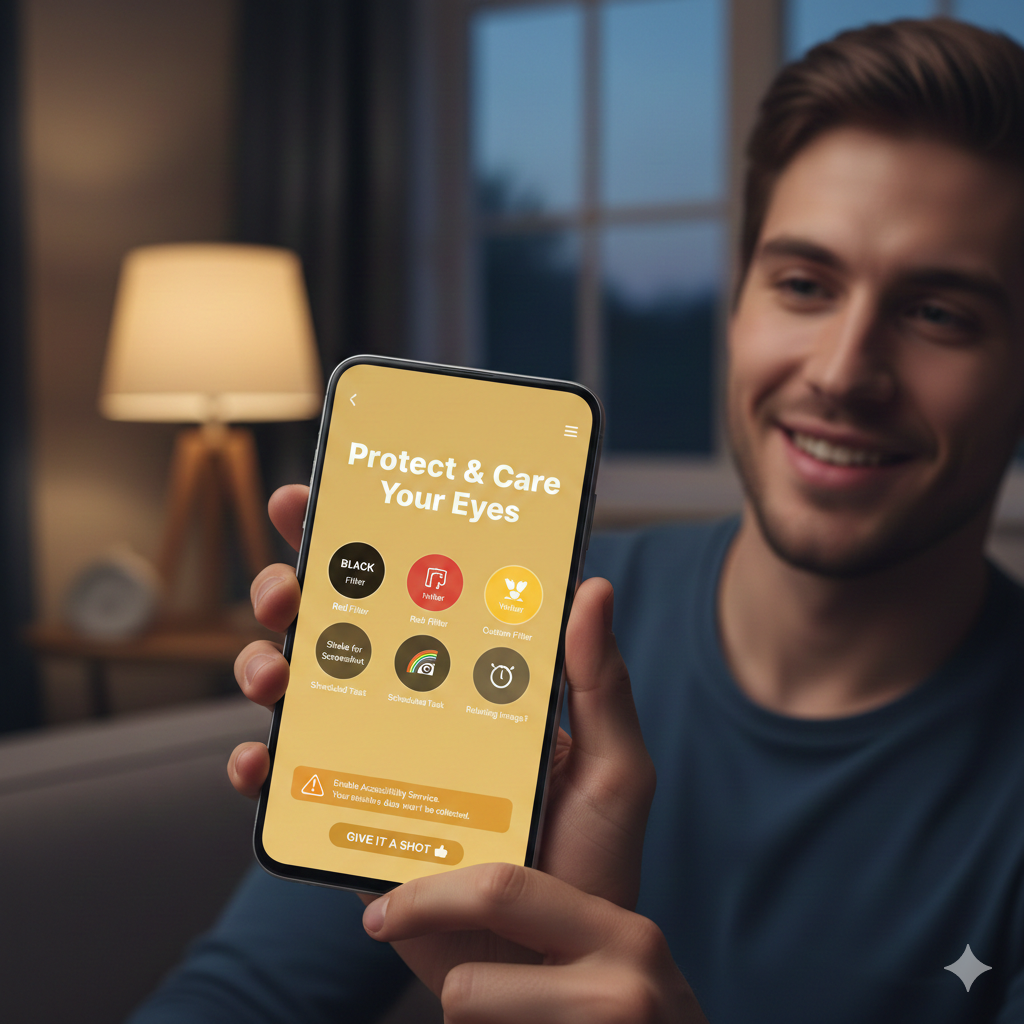
    • Color Filter Versatility (🌈): It moves beyond the standard single-color filter by offering several options to suit different preferences and lighting environments:
      • BLACK
      • Red
      • Yellow
      • Custom filter options (This is particularly valuable, as it allows users to fine-tune the color temperature and intensity to their exact comfort level.)
    • Convenient Screenshot & Sharing (📸): The “Shake to catch and share screenshots” feature introduces a quick, interactive way to capture your screen, streamlining the process of sharing content.
    • Scheduled Operation (⏰️): The “Scheduled task” function is a highly practical feature, allowing users to automatically turn the filter on and off at specific times (e.g., turning the blue light filter on as the sun sets), ensuring consistent eye protection without manual effort.
    • Relaxation & Breaks (🏞️): The inclusion of a “Relaxing image” suggests a feature designed to encourage and facilitate micro-breaks, offering a simple visual cue or image to focus on, helping to reset the eyes from the intensity of app interfaces.

    ⚠️ A Note on Accessibility and Trust

    To achieve its full protective capability—specifically, to ensure the blue light filter covers the entire screen including the notifications bar, the navigation bar, and the lock screen—the app requires the user to enable the Accessibility Service of Eye Protector.

    For users concerned about privacy, the app provides a crucial assurance: “Your sensitive data won’t be collected.” This commitment is vital for an app that needs deep system-level permissions to function effectively.


    💡 Conclusion: Time to Give It a Shot

    INSTALL

    The vast majority of app reviews rely on user experience, not marketing copy. “Eye Protector” presents a compelling case for anyone struggling with digital eye strain. Its features are well-focused on the problem, offering essential color filtering, automated scheduling, and helpful utility functions like the shake-to-screenshot feature.

    The requirement for the Accessibility Service is a necessary trade-off for full screen coverage, and the explicit privacy guarantee helps build trust.

    As the blog post cheekily suggests, “We can’t judge a book by its cover.” If you’ve been looking for a dedicated and feature-rich solution to make your screen time more comfortable, this “cute guy” of an app is certainly worth downloading and trying out. It could be the simple tool you need to significantly improve your digital well-being.